| ||||||||||||||||||||||||||||||||||||||||||||||||||||
|
MobiSys '05 Paper
[MobiSys '05 Technical Program]
Reincarnating PCs with Portable SoulPads
Ramón Cáceres Casey Carter Chandra Narayanaswami Mandayam Raghunath {caceres, chandras, mtr}@us.ibm.com, casey@carter.net Authors listed in alphabetical order
Abstract The ability to walk up to any computer, personalize it, and use it as one’s own has long been a goal of mobile computing research. We present SoulPad, a new approach based on carrying an auto-configuring operating system along with a suspended virtual machine on a small portable device. With this approach, the computer boots from the device and resumes the virtual machine, thus giving the user access to his personal environment, including previously running computations. SoulPad has minimal infrastructure requirements and is therefore applicable to a wide range of conditions, particularly in developing countries. We report our experience implementing SoulPad and using it on a variety of hardware configurations. We address challenges common to systems similar to SoulPad, and show that the SoulPad model has significant potential as a mobility solution. 1 IntroductionToday’s laptop computers give users two highly desirable features. One is the ability to suspend a computing session (e.g., running applications, open windows) and resume it later, perhaps at a different location. The other is access to their personal and familiar software environment (e.g., applications, files, preferences) wherever they are. In spite of this convenience, a major drawback of this model is that the user has to carry a fairly bulky device. In addition, though docking stations allow the user to use a larger display and attach some peripherals, the user is limited to the capabilities of the hardware integrated in the portable computer, such as the processor and memory. Before the advent of portable computers, there were two main approaches to suspending a session in one location and resuming it at another. One method was based on process migration between the machines at the two locations [3, 17]. Another technique was to move just the user interface and graphical windows across stationary machines while continuing to run the application processes on a single machine [11, 15]. There are several solutions that store the user’s data on a central server to make it possible for a user to log in to one of several machines that are connected to the server and have a common startup environment [16]. More recent solutions to this problem have centered on the use of virtual machines. For example, in Internet Suspend/Resume (ISR) [7, 8] the user’s computation state is stored as a check-pointed virtual machine image in the network when computation is suspended, and retrieved from the network when computation is resumed at a machine that has similar base software. ISR has since explored using a portable storage device as a cache [18].
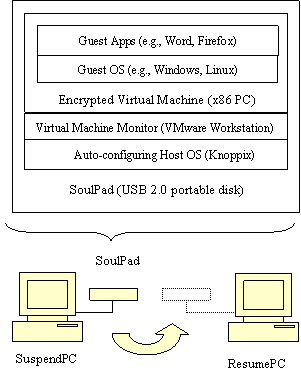
Figure 1: SoulPad architecture and use.
In this paper we present SoulPad, a portable device carrying the software stack shown in Figure 1, that allows a user to walk up to a hitherto unseen personal computer and resume a personal computing session that was suspended on another machine. The SoulPad approach exploits portable storage devices, fast local wired connections, auto-configuring operating systems and virtual machine technology, while coexisting with the widely deployed PC ecosystem. In summary, we decouple the user’s machine into a body (display, CPU, RAM, I/O) and a soul (session state, software, data, preferences). The soul is carried in a small and light portable device, the SoulPad. The soul can reincarnate on any one of a large class of x86-based personal computers with no preloaded software, and effectively convert that computer into the user’s computer. The computers on which the SoulPad can reincarnate itself on are denoted as EnviroPCs. We presently rely on USB 2.0 connections between the SoulPad and the EnviroPC. The EnviroPC’s CPU, memory and I/O devices are used to run the software on the SoulPad. There are several practical advantages to our method. The first is that the SoulPad has no battery and thus the user need not worry about recharging it. The second is that no network connectivity is required to retrieve suspended state. Another advantage is that the EnviroPCs do not require any preloaded software and thus can be unmanaged. In fact, the EnviroPCs can be diskless and can be relegated to pieces of furniture that don’t require constant monitoring for viruses. Since all software running on the EnviroPC comes from the SoulPad and belongs to the user, the user does not have to trust a preinstalled operating system on the EnviroPC. Our approach also allows the user to exploit the full capabilities of the EnviroPC, for example a high-resolution display or a fast processor. Finally, by resorting to a fast wired connection between the SoulPad and the EnviroPC, we avoid the problems associated with wireless connections between the two devices – namely device disambiguation and association, and the power consumed by wireless communication as in the Intel Personal Server [21]. We observe that these advantages are in addition to the general benefits of virtualization, such as encapsulation and easier system migration. We believe that the SoulPad approach could change the way computers are built and used. If the software on the internal disks adopt the SoulPad stack, users will be able to easily migrate from one machine to another by simply moving the disk. For example, a business professional could insert his disk into a light and compact laptop for travel, into a larger but more powerful laptop for regular use, and even into a wearable computer with an eyeglass-mounted display if necessary. Obviously, the disk attachment interface must be compatible with the different form factors. Our method is also particularly well suited to developing countries, where a large class of society cannot afford to buy computers and keep them connected to the Internet. Voltage fluctuations and power outages also add to the problem. Shared community PCs provide a solution in such environments. For example many people use web-based applications from public places. However, this solution does not address the personalization and environment preservation issue. By moving to a model where users own the SoulPad and borrow or rent the EnviroPC, we can reduce their investment and offer them personalization and environment preservation across suspend and resume cycles. Our approach has only recently become feasible. Technical advances in storage devices have made it possible to carry small disk drives that fit in a pocket and hold upwards of 60GB for around US$150 (in May 2005). Flash storage of several gigabytes already fits on a key fob. Clearly we can expect tens of gigabytes to fit on smaller and cheaper portable and wearable devices over time. Atomic Force Microscope (AFM)-based storage technologies such as Millipede [20] can have a density of 125 GB per square inch ― ten times higher than the densest magnetic storage available today. Already several portable music players such as the Apple iPod and some digital image viewers feature large drives. Interfaces like USB 2.0 provide sustained data access rates of more than 150Mbps, leading to acceptable resume and suspend times. Compared with today’s laptop model, the disadvantages of our method include the performance degradation due to virtualization, and longer resume times. In addition, portable devices are susceptible to loss or damage, but regularly backing up the contents of the SoulPad can address this issue. We have implemented our solution and report our results in this paper. We address suspend and resume times and how they vary with disk, processor, and interconnect speeds; runtime overheads caused by virtualization and use of an external disk; practical issues that arise due to evolution in processor architecture; and security issues. We first present the software architecture of SoulPad, followed by our implementation and experimental results. We then discuss some of the issues we had to deal with as we moved from concept to prototype, and some challenges that remain. A number of these issues are relevant to other efforts such as ISR [7, 8] and the Stanford Collective [13] that also use virtual machine technology for mobility. Finally, we discuss some of the related work that has helped shape our solution. Throughout this paper, we use the term SoulPad to refer both to the design of our system and to any device that embodies that design. 2 Architecture2.1 ComponentsWe want SoulPads to work with a wide range of x86 EnviroPCs without relying on a preinstalled operating system. We also want to allow the user to preserve session state across EnviroPCs. In order to meet these needs, the software stack on the SoulPad has the following three components:
1. A Host OS that boots on EnviroPCs and addresses hardware diversity via auto-configuration. 2. A Virtual Machine Monitor (VMM) that can suspend/resume virtual machines and supports Guest OS diversity. 3. A Virtual Machine (VM) that runs the user’s applications on a Guest OS of the user’s choosing. While booting on an EnviroPC, the auto-configuring Host OS discovers the hardware characteristics and I/O devices of the EnviroPC, and configures itself to the hardware present by installing appropriate driver modules. Auto-configuration is a requirement for this layer since the SoulPad has to boot on an EnviroPC that it may not have seen before. This characteristic contrasts with a traditional operating system that goes through a separate install phase. Once this step is complete, the Host OS provides a known environment for the next layer, namely the Virtual Machine Monitor. The VMM runs a virtual machine, relying on the underlying Host OS for any services that the VM requires. The VM provides an environment on which the user’s operating system and applications (also stored on the SoulPad) are run. Since the user’s computing environment runs on top of a VM, it is possible for the VMM to suspend the user’s session state and resume it later. The suspended session state is also stored on the SoulPad. The user can suspend his session, then shut down the VMM layer and the Host OS, and walk away with his SoulPad. The user can later attach the SoulPad to a different EnviroPC, start the Host OS and the VMM layer, then load the suspended session state, resume it, and continue his session. If the user’s tasks do not require network access, the PC may be completely disconnected from the network.
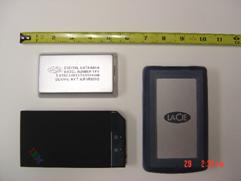
Figure 2: A sample of USB 2.0 portable disks used as SoulPads. Clockwise from upper left: LaCie 40GB DataBank, LaCie 60GB PocketDrive, and IBM 40GB Portable Hard Drive. The generality of our three-level architecture allows users a choice of personal computing environments, from Windows to Linux to any other OS that can run on the VMs provided by the VMM. Users can even maintain multiple Guest OS environments on the same SoulPad, each OS running in its own VM. 2.2 Issues addressedThe issues we addressed in the course of building our SoulPad prototype are listed below.· Performance: Working on a VM introduces some overhead when compared to working on bare hardware. Using an external disk instead of an internal disk could make the situation worse. We therefore evaluate the suspend/resume and operational performance of SoulPad.· Security and privacy: Portable devices are prone to theft and loss. We safeguard privacy by encrypting the user data stored on a SoulPad. Moreover, since the software on EnviroPCs may not be trustworthy, we rely only on their hardware and firmware.· Reliability: Portable devices are prone to damage and loss. We implemented a way to recover the contents of SoulPads from a backup source.· Hardware independence: There are many hardware differences between PCs. Some of these differences are hidden by VM technology, but others are exposed to the Guest OS and its applications. We need to determine across how wide a range of PCs SoulPad will operate.The following section describes how we addressed some of these issues with our implementation. Later sections will return to discuss these and other challenges in more detail.3 Implementation3.1 OverviewWe used off-the-shelf USB 2.0 portable disks as SoulPad devices. Figure 2 shows some examples. These devices are much smaller and lighter than portable PCs. For example, the LaCie 40GB DataBank measures 4.4 x 2.5 x 0.6 inches and weighs 4.8 ounces. In contrast, a latest-generation “ultraportable” notebook computer like the IBM ThinkPad X40 measures 10.5 x 8.3 x 1.06 inches and weighs 2.7 pounds. Despite their small size, these portable disks have comparable storage capacity to notebook and laptop PCs, e.g., 40-60 GB. They in fact use the same hard-disk technology. Given the popularity of portable PCs, it follows that SoulPads can satisfy the storage needs of large numbers of users. To implement the software architecture described in the previous section, we made the following choices:
1. Knoppix for the auto-configuring Host OS. 2. VMware Workstation for the VMM. 3. Windows or Linux for the Guest OS.
Knoppix [24] provides us with the zero-install and auto-configuration features that SoulPad needs from a Host OS. Knoppix is a version of GNU/Linux distributed as a single bootable CD that includes the Linux kernel and a range of applications. Knoppix enables users to get a familiar Linux desktop along with their favorite applications on almost any PC without having to install any software on the PC’s hard disk. The bootloader from the CD loads a Linux kernel and an in-memory disk image called the Initial RAM Disk. Subsequently, Knoppix scans for devices, loads the appropriate device drivers, initializes discovered network interfaces, generates an appropriate X11 configuration for the discovered display hardware, and carries out other auto-configuration steps. These steps are necessary because Knoppix does not have prior knowledge of the hardware configuration of PCs on which it boots. An in-memory filesystem is created for read-write data. All of the applications, libraries and other read-only data reside on a compressed filesystem on the CD, which is mounted using a loopback device in the kernel. The compressed filesystem approach enables Knoppix to pack almost 2 Gigabytes of data onto a single 700MB CD. All of the local session state created by the user typically resides in the in-memory filesystem and is lost when the user shuts down Knoppix. Some users combine a Knoppix CD with a small USB flash key where they store their personal files and other persistent data. We create a SoulPad disk by first installing Knoppix on a USB hard disk, using the hard-disk install script that comes with Knoppix. We also install a bootloader on the USB disk that loads the kernel and the Initial RAM Disk in the same manner as the bootloader on a Knoppix CD. We had to make a few modifications to the Initial RAM Disk and startup scripts, for example to ensure that USB-related kernel modules were loaded before trying to mount the root file system from the USB disk. With these changes, we were able to take the USB disk from one machine to another and boot a Knoppix environment. While Knoppix by itself enables users to walk up to any PC and personalize it with their Linux environment, there is no easy way for users to preserve their computing state as they move from one machine to another because Knoppix needs a full reboot every time it is moved. Knoppix users are also limited to that one OS. We installed VMware Workstation [24] on top of Knoppix to support suspend/resume of user sessions as well as OS diversity. We then created virtual machines on which we installed Windows XP Professional or a Linux variant as the Guest OS. We automated the SoulPad suspend and resume sequences so that each runs to completion after an initial user action. Users initiate suspend by selecting the VMware Workstation suspend operation on their screens. After the VM suspends, Knoppix shuts down and powers down the machine. At this point the user can disconnect the SoulPad from one PC and connect it to another. Users initiate a resume operation by powering up the new PC so that it boots from the SoulPad. The PC boots into Knoppix, which starts VMware Workstation, which resumes the Guest OS session. On our SoulPad disks we created a 4GB partition to hold Knoppix and a 2G partition to serve as swap space. The remaining disk space is available for sharing among VM images. For example, on a 40GB disk holding only one VM, 34GB are available for the Guest OS environment. 3.2 Encrypted virtual machine imageTo protect user data if a SoulPad is misplaced or stolen, we encrypt the disk partition that holds the VM images using the AES128 block cipher. We used the publicly available loop-aes package for Linux in our implementation. The encryption key is generated by hashing a user-supplied passphrase. After the Host OS boots, it prompts the user to enter the passphrase. If the user supplies an incorrect passphrase, the resulting hash will not correspond to the AES key and the mount operation will fail since the decrypted data will not correspond to a valid filesystem. In order to defeat brute force attacks that attempt to guess the passphrase, the loop-aes package requires the passphrase to be at least 20 characters long. For convenience, we permit users to supply this passphrase via an auxiliary USB flash key. While the Guest OS partition is mounted, the AES key is retained in kernel memory. When the partition is unmounted, the AES key is erased from memory. It is never stored on disk. At run time it is possible that the Host OS swaps out pages holding the user’s Guest OS state to the swap partition on the SoulPad. We also use loop-aes to encrypt the swap partition to prevent user data from appearing in plaintext form on the SoulPad. The key for the swap partition is auto-generated for each session since swap state does not have to be preserved across Host OS boot cycles. SoulPad never writes to the internal disk on an EnviroPC. Therefore, there is no risk of leaving sensitive data on the PC’s persistent storage after disconnecting. 3.3 Networking configurationAt resume time, if the EnviroPC is connected to a network with a working DHCP server, the Host OS will obtain an IP address and establish network connectivity. The VMware Workstation virtual machines are configured to use Network Address Translation (NAT) to connect to the external network through the Host OS. Thus, the Guest OS enjoys network connectivity whenever the Host OS does. In short, from a networking perspective, a SoulPad suspend followed by a resume is similar to suspending a laptop at one location and resuming it at another location. Many networked applications already support suspend and resume of laptops, e.g., email and instant messaging clients. They simply attempt to re-establish their network connections at resume time. Similarly in the case of SoulPad, such applications running inside the Guest OS re-establish their connections when they are able to do so. In some cases, the resume may happen outside an intranet and some network resources may not be reachable unless the user establishes a VPN connection into the intranet. Laptop users are already familiar with such situations and the behavior is identical while using a SoulPad. 3.4 BackupsIn our enterprise environment we have configured backups from the SoulPad to Tivoli Storage Manager (TSM), a file-level networked backup service. Whenever the SoulPad is connected to a PC that has connectivity to the TSM server, we perform an incremental backup of the SoulPad. If a user loses his SoulPad, a copy of it can be re-created from the backup server. Again, this model is similar to the situation where a user loses his laptop and has to recover data from the most recent backup. On our prototype SoulPads, we have configured incremental backups both at the Host OS and Guest OS levels. At the Host OS level any changes to Guest OS files appear as changes to the large binary files corresponding to the VMware Workstation virtual disks. Our current backup implementation does not handle minor modifications to large binary files very well, as it simply treats the file as having changed and transfers the entire file to the backup server. So, we specifically exclude these files from the files backed up at the Host OS level. Instead we rely on the incremental backups at the Guest OS level to back up the modified Guest OS files. In the future we propose to investigate better backup schemes that handle large binary files. We do not backup the suspended virtual machine state at suspend time because this would add considerable latency to the suspend operation. This means that if the user loses the SoulPad, he also loses the latest session state and must reboot the VM after recovering SoulPad state from backup. In environments with poor infrastructure where managed network backup services are not viable, it is possible to perform local backups using LAN-connected devices such as Mirra [24], or backups to a second locally connected USB storage device. 4 Experimental ResultsWe confirmed the usability of SoulPad through a variety of experiments. These experiments fall into three main categories: resume and suspend latencies, application response times, and hardware independence. This section describes our methodology and results. The SoulPad software stack used in all experiments consisted of Knoppix 3.4, VMware Workstation 4.5.1, and Windows XP Professional. In addition, VMware Tools was installed in the Guest OS of all VMs.
Table 1: Characteristics of disks used. We used disks with varying characteristics, as shown in Table 1. The transfer rates are averages of 10 runs of the hdparm –t Linux command. This command measures how fast the drive can sustain sequential data reads, without file-system buffering effects. All transfer rates were measured on a NetVista desktop PC, using a USB 2.0 connection for all but the IDE disk. As shown, the IDE disk has close to twice the transfer rate of the fastest USB disk. There are also large differences in transfer rates among USB disks. 4.1 Resume and suspend latenciesResume and suspend latencies are key to SoulPad’s usability. We define resume latency as the time between when the user powers up the SoulPad-EnviroPC combination, and when the VM has finished resuming, i.e., when the user can continue working. We define suspend latency as the time between when the user requests that the VM be suspended, and when the Host OS has saved modified state to the SoulPad and shut down, i.e., when the user can walk away with his SoulPad.
Table 2: Resume and suspend latencies, sorted by increasing resume time. We designed our suspend/resume experiments to expose the effects of disk speed, interconnect speed, processor speed, and memory size. Table 2 shows averages and standard deviations calculated over at least 10 runs for a variety of disk and PC configurations. The NetVista and ThinkCentre PCs are desktop machines; the two ThinkPad models are laptops. In all these experiments, there were 256MB of memory and 16GB of disk space allocated to the virtual machine. In the interests of simplicity and space, we omit results for hardware combinations that do not expose significant additional information. The first row of Table 2 serves as a reference point for additional observations. For the results in this row, we installed the SoulPad software stack on the internal disk of the NetVista instead of on a portable disk. It is noteworthy that external USB drives achieved resume times close to those of the internal IDE drive. For example, the average resume time on the PocketDrive connected to the same NetVista PC was only 5 seconds longer than the reference (121 vs. 116 seconds). The average suspend time on that same configuration was 16 seconds longer than the reference (26 vs. 10 seconds). Disks with lower transfer rates and rotational speeds, like the DataBank and MobileDrive, have longer resume and suspend times. Other disk characteristics not captured in Table 1, such as buffer size, also affect the resume and suspend latencies shown in Table 2. Another observation is that physical memory size matters for SoulPad. Resume and suspend latencies are noticeably longer on the ThinkCentre PC with 512 MB less memory than the other PCs, even though the ThinkCentre has the fastest CPU. Resume time rose to nearly 3 minutes and suspend time closer to 1 minute. Finally, the last row of Table 2 makes clear that USB 1.1 is too slow to support SoulPad. Resume times when using USB 1.1 rise to more than 16 minutes while suspend times rise to more than 6 minutes. Our overall conclusion is that SoulPad is usable on a range of existing portable disk and PC configurations. Disk transfer rate and physical memory size have a significant effect on resume and suspend latencies, while processor speed has less of an effect (at least for the 1.7-3.0 GHz range we used in our experiments). Disk-to-PC interconnects with speeds comparable to USB 2.0 are required but increasingly standard on commercially available PCs. We proceeded to collect fine-grained timings of different stages in the SoulPad suspend and resume sequences. As a timing mechanism, we used the Time Stamp Counter (TSC) available on x86 processors. This monotonically increasing value resets to zero on each powerup, advances with each clock cycle, and can be read by a single instruction from firmware, the boot loader, kernel space, or user space. Table 3 and Table 4 contain timings captured during sample resume and suspend runs, respectively. Both runs used the DataBank disk connected over USB2.0 to the NetVista PC, as in the fourth row of Table 2. As shown in Table 3, the sample SoulPad resume operation took almost 140 seconds. Autoconfiguring the Host OS accounted for somewhat less than half of this time, or roughly 57 seconds. We will see below that there is room for reducing the latency of this stage.
Table 3: Resume stages and sample latencies.
Table 4: Suspend stages and sample latencies. The time to load VM state from disk into memory and resume the running VM is another major contributor to total resume latency, also accounting for roughly 57 seconds in the sample run of Table 3. Techniques such as ballooning [13] can be used to reduce the latency of this stage. Ballooning zeroes unused pages of physical memory allocated to VMs. These pages would then lend themselves to more effective compression for transfer between SoulPads and PCs. As shown in Table 4, the sample SoulPad suspend operation took under 22 seconds. The two main components of this latency are the time to stop the VM (roughly 6 seconds) and the time to save to disk the contents of the VM’s memory as well as other recently changed VM state (roughly 16 seconds). Aside from the contents of the VM memory, the amount of state saved at suspend time is relatively small because writes to the VM’s virtual disks have been propagated to the SoulPad throughout the VM’s operation. We then explored ways to reduce the resume latency by streamlining the Knoppix autoconfiguration procedure. The results in Table 2 were obtained using a base Knoppix installation. We were able to eliminate two steps from this base case: rebuilding the mapping from library names to path names, and rebuilding kernel-module dependencies. The former is necessary only when libraries are installed or moved, and the latter is only necessary when kernel modules are added, changed, or removed. Such Host OS configuration changes will be rare on a SoulPad since the Host OS is only used as a vehicle to bring up a virtual machine. This layer of the SoulPad architecture can be tightly managed by system administrators working for enterprises or service providers.
Table 5: Impact on resume and suspend latencies of streamlining the Host OS boot sequence, then storing the VM image in an encrypted file system. Table 5 shows the impact on resume latency of eliminating these two steps. These measurements were done on the same DataBank-NetVista combination shown in the fourth row of Table 2, yielding a baseline resume time of 141 seconds. As shown in Table 5, streamlining the Knoppix autoconfiguration stage reduced resume latency by 12 seconds, to 129 seconds total. Further optimizations of the boot sequence may be possible. Table 5 also shows the impact of encrypting the VM image. We placed the VM image on a file system encrypted with the AES128 cipher. We then measured suspend and resume latencies on the same DataBank-NetVista combination after streamlining the Knoppix autoconfiguration stage. As shown, resume latency rose by 10 seconds but remained below the original 141 seconds, and suspend latency rose by 6 seconds but remained below 30 seconds. We conclude that using an encrypted file system is both desirable and viable. Finally, it is useful to compare SoulPad suspend/resume times to hibernate/resume and shutdown/boot times on today’s portable computers. Hibernation saves the session state to disk before powering down the machine. Resume after hibernation restores the session from disk. Shutdown and boot are familiar operations common to all PCs. Portable PCs also offer a standby/resume feature, but it cannot hold session state for arbitrary periods of time. Standby holds state in volatile memory and draws battery power. We measured a ThinkPad T41 running Windows XP from its internal IDE disk. Over three runs, hibernate and resume times both varied between 26 and 28 seconds, shutdown times varied between 31 and 43 seconds, and boot times were stable around 50 seconds. In comparison, on that same ThinkPad T41 running off the DataBank disk, Table 2 shows that SoulPad suspend times averaged 26 seconds and resume times 134 seconds. We see that SoulPad suspend times are roughly equal to hibernate and shutdown times, although the user must always wait for the SoulPad suspend sequence to complete before walking away. SoulPad resume times are considerably longer than resume-after-hibernate and boot times. The extra waits are the price to pay for the added portability and hardware independence of SoulPad. However, these suspend/resume latencies can be expected to improve with continuing hardware and software advances. 4.2 Application response timesApplication response times are another key metric of SoulPad’s usability. The time it takes for applications to respond to user-initiated operations is a measure of what it feels like to use the system for everyday work. We used SYSmark 2002 [22], an industry-standard benchmark suite, to evaluate the overhead introduced by the SoulPad three-level architecture when compared to a standard OS installation running on bare hardware. SYSmark employs workloads that emulate common uses of Windows PCs in business environments. The workloads fall into two classes: Office Productivity and Internet Content Creation. Office Productivity exercises nine applications that include programs in the Microsoft Office suite and McAfee VirusScan. Internet Content Creation exercises five applications: Adobe Photoshop, Adobe Premiere, Macromedia Dreamweaver, Macromedia Flash, and Microsoft Media Encoder. SYSmark measures the time it takes for applications to complete tasks initiated by mouse clicks or keystrokes. It uses Visual Test and Visual Basic to emulate a person sending commands to the computer. The sequence of commands was chosen by observing industry professionals at work. Additional detail on the workload generation and performance measurement methodology is available from the SYSmark 2002 documentation [22]. At the end of a run SYSmark reports the average response time over hundreds of operations. Given the variety of these operations, from replacing a word in a text document to re-encoding a video clip, it is more meaningful to examine the relative response times between system configurations than the absolute values. In our results we thus normalize response times to a baseline system configuration. All our SYSmark runs used the NetVista PC with 1 GB of memory installed in the physical machine, and 512 MB of memory allocated to the VM when a VM was used.
Table 6: Normalized response times (with standard deviations) as reported by SYSmark 2002. Table 6 show response time averages (with standard deviations in parentheses) across three runs of the Office Productivity and Internet Content Creation workloads. The row labeled “Physical, IDE” represents our baseline configuration: Windows XP Professional running on the physical machine and from the internal IDE drive. The row labeled “Virtual, IDE” corresponds to running the SoulPad three-level architecture, but still from the internal IDE drive. It is intended to isolate the overhead of virtualization from the overhead of using an external drive. The row labeled “Virtual, USB” corresponds to running the SoulPad architecture on the PocketDrive connected via USB 2.0. This last row also includes the overhead of storing the VM image on an encrypted file system. Our overall conclusion is that SoulPad is usable on today’s portable disks and PCs, and it will become increasingly usable as hardware continues to improve. Across the two workloads, moving to a VM-based configuration on the IDE drive incurred a 26-29% increase in response time. Moving to a VM-based configuration on the USB drive incurred a 38-42% increase over the baseline. These overhead numbers seem high, but with today’s fast disks and PCs, absolute performance remains acceptable for a large class of business and personal users. It is interesting to note that this slowdown is roughly equivalent to using a one year-old machine without virtualization. As further anecdotal evidence, one of the authors has used VMware Workstation on laptop-class PCs since 2000, and found its performance acceptable for everyday work. User-perceived performance can also be expected to improve along with hardware and software advances. 4.3 Hardware independenceA remaining usability question is: across how wide a range of PCs will SoulPad work? We ran experiments on a larger collection of PCs than mentioned so far in order to explore these hardware independence issues. Among these additional systems were six models of IBM ThinkPad laptops, four models of IBM ThinkCentre desktops, and a Dell Dimension desktop. While SoulPad worked smoothly on the earlier set of machines, we ran into a number of practical obstacles when we expanded the set. One problem is that not all PCs would boot SoulPad from USB. Increasingly, new PCs include a BIOS option to boot from USB mass storage devices. However, many legacy PCs do not offer this option. Furthermore, the option is not uniformly easy to use on PCs that do offer it. Sometimes booting from USB must first be enabled. Once enabled, the USB option must be placed in priority order with respect to other boot devices. On some PCs, it is necessary to reposition the USB option in the priority order every time a different USB device is attached, or even on every boot operation. Only on some recently manufactured PCs is it possible to position the USB option once for all time and all devices, so that the PC will always boot from a SoulPad when one is connected. We worked around these difficulties by creating an auxiliary mini-CD containing a boot loader that quickly switches the boot sequence to a USB device. Booting from CD is universally supported on current-generation PCs, usually higher in priority than booting from internal disk. Using this CD we were thus able to use SoulPad on all the PCs we tried. SoulPad users could carry such an auxiliary CD for use when booting from USB is not available or properly configured. However, over time we expect that booting from USB will attain the ubiquity and ease of use of booting from CD. Another problem is that SoulPad was not always able to resume a user session with the same graphics configuration in use at suspend time. Graphics settings are personal choices determined by factors like visual acuity and application mix. Graphics capabilities vary widely among PCs. For example, some machines support display resolutions as high as 1600x1200 pixels, while others only 1024x768. As a result, it was sometimes necessary to manually change graphics settings after a resume operation. For example, the display resolution and color depth settings in the Guest OS must match those of the Host OS in order for a VM to use the full screen, and not be limited to running inside the Host OS window allocated to the VMware Workstation application. It is possible to work within that window, but it is often preferable to cede the whole display to the Guest OS, for example to hide from naïve users that they are dealing with a virtual machine. Further work is needed to automatically adapt the overall graphics configuration for best effect. A final problem we ran into occurred when a PC did not have enough memory to run the VM stored in a SoulPad. Our default SoulPad configuration allocates 256MB to the VM. These VMs would not resume on PCs with 256MB or less of total physical memory. In principle the VMM should be able to swap portions of the VM as necessary to operate with smaller memory sizes (at the expense of performance), but current VMM implementations have limitations in this area. Ideally, the VMM and Guest OS should adapt to the amount of physical memory available at resume time. The above experiences make clear that work remains before the full promise of VM-based mobility, where “any PC is your PC”, can be realized. However, it is important to note that such mobility is already practical if constrained to a known subset of PC models and configurations, as is the case in many enterprise settings. In addition, with some planning and testing, any single PC manufacturer can ensure that a SoulPad-like solution works on all its offerings. The following section discusses additional hardware independence issues. 5 Discussion and Future Work5.1 Instruction Set Architecture (ISA) diversityThe x86 architecture has steadily evolved over the years with the addition of instructions to meet the demands of applications such as media processing, security, etc. Table 7 shows the changes to the Intel ISA between 1997 and 2004. For performance reasons, today’s VM technologies permit guest operating systems to query the hardware and determine which instructions are supported, and directly execute the instructions that are available. When we use VM technology for mobility we encounter the situation of suspending a VM on one machine and resuming it on another machine that may not support the same set of instructions. For instance a VM may be suspended on a Pentium IV and resumed on a Pentium III. The Guest OS and applications may have queried the hardware on the Pentium IV, determined that SSE3 instructions are available, and subsequently try to execute them on the Pentium III where such instructions are not supported. Since the SoulPad moves the Host OS and the VMM layers from machine to machine, these layers have to deal with different ISAs as well.
Table 7: Intel processor evolution. 5.1.1 SolutionsThe approach to handling ISA diversity varies by layer. Let us first consider the Host OS. Since ISAs are typically backward compatible, the Host OS (kernel and other executables) can be configured for an older processor family such as 386 and be expected to work on newer processor families. This approach does not use the newer instructions and could result in lower performance. This drawback can be addressed by keeping multiple copies of ISA-dependent components of the Host OS, each configured to a different ISA, and choosing the appropriate version at boot time. Since the only function of the Host OS is to run the VMM we do not believe the storage overhead for carrying multiple versions of these components will be significant. Similar approaches can be applied for the VMM as well. When the VMM is started the version corresponding to the ISA of the EnviroPC can be used to ensure that the VMM itself does not use any unsupported instructions. The matter is much more complicated for the VM image, because we need to suspend and resume the Guest OS and applications without restarting or reinstalling. If operating systems and applications could dynamically adapt to changes in the ISA, the VMM could simply signal the Guest OS that the ISA has changed and expect the adaptation to take care of this problem. While such dynamic adaptation to ISA changes is a hard technical challenge, there have been several examples where applications have evolved the ability to survive changes in the environment. For instance, in the early stages of graphical windowing systems, applications were written to fixed display resolution and window sizes. However, today most applications dynamically adapt to changing graphics configurations. Similarly, many applications have been made resilient to changes in network settings. Several server operating systems have developed the ability to dynamically reconfigure themselves (without rebooting) to changes in hardware resources such as amount of DRAM, number of CPUs, and I/O devices. One way of handling dynamic ISA changes is to compile applications such that the performance critical sections of the code are built for different ISAs, while the other sections are built for the oldest ISA. At run time, applications choose the ISA-specific code paths in the performance-critical sections. When a suspend request is received, applications complete the current performance-critical section before allowing suspension. At resume time, the application probes the ISA so that subsequent performance-critical sections take the paths corresponding to the new ISA. Such an approach can also be used in the Host OS and the VMM layers to avoid carrying multiple versions. In summary, all layers of software need to be aware that they may be suspended on one processor family and resumed on another. They should adapt to the change if performance benefits of newer processor architectures are to be exploited and mobility across a larger class of machines is desired. 5.1.2 Practical workaroundsSince dynamic adaptation to ISA changes is not currently supported by PC operating systems, compromises are necessary to use VM technology for mobility. At present there is a tight binding between the software and the ISA it runs on. The binding typically happens at compile time or install time, though it can happen later as well. If the binding happens only at compile or install time we could install the entire guest VM software on an old processor family. If all the EnviroPCs encountered by the user are the same or newer, none of the unsupported instructions will be encountered. At the same time none of the performance enhancements possible with the newer ISA will be used by the guest VM. If the user were to try to use the SoulPad with an ISA that is older than the one configured, the Host OS should refuse to resume the VM. This workaround would limit the range of the EnviroPCs that can be used. While this approach works, it delivers lower performance. If the Guest OS and applications bind to the ISA at start time instead of install time, the VMM may ask the user to reboot the Guest OS or restart the appropriate applications when a different ISA is encountered. This approach will exploit the highest performance offered by the current ISA, but will result in lower usability. Another method is to be more aggressive and configure the guest VM software for the most recent processor architecture. When running on an older machine and an unsupported instruction is encountered, the VMM should emulate it using available instructions. To the best of our knowledge, today’s VMMs do not emulate missing instructions. If this feature was added, a penalty is paid only when the user visits older machines. If applications bind to the ISA at start time, it may be advantageous to restart them on older ISAs instead of relying on instruction emulation support provided by the VMM. If instruction emulation support is provided in the VMM, it is important to ensure that when newer instructions are added to the ISA, emulation support is made available before the Guest OS or any applications start using those instructions. 5.2 Software licensingMachine virtualization disrupts traditional approaches to software licensing. For instance, the arguably dominant licensing model for PC software permits use of the software “on a single computer”. In the absence of VM technology this model is relatively easy to understand. However, the introduction of VM technology, VM-based mobility, and SoulPad raises difficult questions, such as: 1. Should the term “computer” be taken to mean a virtual or physical machine? 2. Should the term “computer” be taken to mean the processor that runs the software or the storage device that holds the software? 3. Should users be allowed to run the software on two or more VMs on the same physical machine? 4. Should users be allowed to run the software on a VM that moves between physical machines? Not only does the language of licenses need to change to make clear the answers to such questions, but software that enforces licenses must also change accordingly. Some software products incorporate code to verify that the user is in compliance with the license terms. A popular form of this code records information about the hardware present at install time, and periodically checks at run time whether the "computer" has changed significantly since the install operation. As we’ve discussed, VMs do not hide all aspects of physical hardware from Guest OSs. Therefore, software installed on a SoulPad may stop working when moved between significantly different physical machines. For VM-based mobility in general, and SoulPad in particular, it is important that software vendors recognize the above issues and devise license terms that accommodate user needs. Some software vendors are already aware of the disruptive nature of VM technology and have started addressing these issues. 5.3 Developing countriesSoulPad is well suited to developing countries. One reason is that it can work on disconnected PCs, so that it is a good fit for environments with poor networking and server infrastructure. Another reason is that it supports personalized computing on shared PCs. Although PC prices continue to drop, in many parts of the world there is more to owning a PC than buying the basic computer. Electric power to homes often suffers from voltage fluctuations and complete outages, forcing the purchase of an uninterruptible power supply to ensure clean software shutdowns and protect the hardware from damage. In addition, many people cannot afford to provide Internet service to their homes. Sharing PCs maintained at a community center or Internet café remains popular because it amortizes these infrastructure costs across multiple users. SoulPad allows users of such shared PCs to maintain widely different software environments without interfering with each other. Furthermore, SoulPad users do not store sensitive data on shared machines. Users maintain physical control over their software and data, while the inherent portability of the solution prevents over-reliance on any particular infrastructure provider. 5.4 Security and privacyWe have lowered the security and privacy risks for SoulPad users in several important ways. One, we start EnviroPCs from a known power-down state. Two, we do not run any software previously installed on EnviroPCs. Three, we encrypt the VM image and swap space on SoulPads. Four, we do not write anything to stable storage in EnviroPCs. Five, we power down the EnviroPC at the end of the suspend procedure to let the memory contents dissipate. Some versions of Knoppix also deliberately wipe memory as part of normal shutdown procedures. However, some security and privacy concerns remain. For example, we have not protected against compromised firmware (e.g., the BIOS). We have also not addressed hardware-related threats such as key loggers or bus snoopers. A future SoulPad with modest processing capacity could query the Trusted Platform Module (TPM) [23] hardware, increasingly available in commodity PCs, to determine that the BIOS is trustworthy before allowing the Host OS to boot. In addition, equipping SoulPads with biometric authentication hardware would be an improvement over our current practice of asking for a passphrase through the EnviroPC. Note that it is not necessary to equip SoulPads with a battery to support biometric authentication or TPM-based attestation. Power for these operations can be obtained from the EnviroPC. The SoulPad model also presents security risks for owners of EnviroPCs. Since the Host OS boots directly on the PC, a SoulPad user has complete control over the PC, including any internal disks and network interfaces. A malicious SoulPad user could damage the contents of a hard disk, or launch a network-based attack. Fortunately, there are ways to prevent SoulPads from modifying internal disks. For example, PC owners could password-protect the disks using facilities already provided by most disks and BIOSes on current PCs. In addition, EnviroPCs can be diskless as described earlier. Addressing the potential for network-based attacks remains an area for future work. 6 Related WorkUsers invest large amounts of time personalizing their
computing environments and setting up computing sessions. They naturally desire
to reuse as much of these environments and sessions as possible. Solutions to
meet this desire have evolved in stages. At first, users of time-shared
machines were satisfied with the ability to reuse data files created during
earlier sessions. As applications became more complex and long-lived,
researchers also attempted to move running processes across machines for load
balancing, single-application mobility, etc. Examples of such efforts include
the V System [17], As computers became more plentiful, users felt the need for a familiar look and feel, i.e., common file systems, desktop look and feel, application preferences, etc., across different machines. Distributed file systems such as NFS, AFS, etc., and networked stations such as X terminals and Windows terminals, allowed users access to remote files and applications from different machines. We have now reached the point where sessions last days or months and users want the ability to suspend a complete working session, i.e., the complete desktop, at one machine and resume at another exactly where they left off. Users also want automatic remapping of peripherals in different settings, such as reassigning the default printer to a local printer in the new location. The related work towards the goal of suspending and resuming a complete session can be split into two broad categories, one that required the user to carry something with them and another that did not. We first look at solutions that did not require the user to carry any device with them. We note that all of these approaches require common software to be installed on the machines. Some approaches like Teleporting [12] and XMove [15] intercept the data flowing between the server and the client at a medium-grain graphics protocol level such as the X protocol. The graphics interface is moved to a different machine and the application continues to run on the same remote machine. The X Server is switched to another client by using a proxy X Server in between the GUI and the remote machine. The proxy is needed to handle the differences in capabilities of the two clients, such as color depth of the frame buffer, color-map tables, etc. Sluggish performance due to high network latencies and exposures in the X security model limited this approach. Another approach drew the line between the application and the graphics I/O at a lower level. Stateless thin clients such as SLIM [16] (elements of which were incorporated into SunRay [24]) and VNC [11] included low-level graphics primitives that operated on the frame buffer, such as bitmap transfers. Applications ran on servers and user input was provided at the thin client. A high-bandwidth connection between the thin clients and servers was necessary for good interactive performance. Users could access their applications from different machines and resume where they left off previously, since all state was maintained at the server. The InfoPad [19] used a similar partition between the application and the GUI, but realized it on a small portable device that included wireless connectivity between it and the server. Chen and Noble [2] observed that virtual machine technology [4] can be used to migrate sessions between computers and thus be used for mobility. Internet Suspend/Resume [7,8] developed this idea and demonstrated that using commercial VM technology such as VMware Workstation, together with a networked file system such as Coda [14], it is possible to walk up to a machine and resume a suspended session. Each ISR client has a Host OS and VMware Workstation preinstalled, and has access to a networked repository of VM images. When a session is suspended the VM image is stored on a server. When a user resumes a session, this image is restored and the session is continued. This model is elegant because the user need not carry a device. However, the host machines need network connectivity and preloaded software. More recently ISR has added portable storage as a lookaside cache to speed up resume time [18]. The copy in the network is considered the primary copy and the portable copy is the secondary copy. The ISR project has independently experimented with running VMware Workstation over Knoppix from a portable storage device, for the purpose of introducing ISR to users without disturbing the internal disks on their machines [5]. Sapuntzakis et al. [13] have studied how to optimize the transfer of encapsulated virtual machine state between different machines. VMotion by VMware [24] is a commercial product that allows migration of virtual machines across different physical machines. MobiDesk [1] transparently virtualizes the display, operating system and network. Applications run on hosting servers. The clients are input and output devices. Individual processes are virtualized instead of the complete operating system environment. The display is virtualized with a virtual display driver which is similar in flavor to that in SLIM and VNC. Network connections operate through a proxy and a technique similar to NAT is used to map fixed virtual address to new physical network addresses. The ability to carry a portable computer, suspend the machine, and resume work at another location has marked the most widespread realization of user mobility. Suspend/resume times were acceptable and people could work disconnected. Network connections had to be re-established and applications needed to be resilient. For example telnet sessions are not preserved. Technologies such as MobiDesk [1] consider how to preserve network connections across session suspend and resume. Efforts to build smaller portable machines with similar functionality include the IBM MetaPad [24], the Antelope Modular Computing Platform [24], the OQO [24], and several wearable computers. The drawback with these approaches is that the user is limited to the capabilities of his portable computer, and cannot leverage more powerful CPU and memory resources even if available. The Intel Personal Server [21] utilizes other devices near it over wireless links and web-based interfaces to view data. The IBM Personal Mobile Hub [6] acts as an intermediary between body worn sensors and back end infrastructure. Some recent commercial offerings attempt to support personalization of anonymous PCs. For example, Migo [24] allows the user to carry personal settings and files on a USB flash key. One limitation of this approach is that it must be tailored for each application to be migrated. MetroPipe [24] starts a CPU emulator on top of an existing OS, then boots a tiny variant of Knoppix. It provides personalized access to networked services, but does not preserve user sessions.
Table 8: Comparison of mobility approaches. Even after restoring personal settings and suspended sessions, it is necessary to adapt to local environments. Solutions such as IBM Access Connections [24] help by changing settings for default printers, network parameters, etc., as users move from one location to another. Table 8 lists some of the benefits and drawbacks of the different solutions. Each solution comes with tradeoffs that are acceptable in certain environments. Approaches that separate the applications from the user interface require reliable low-latency networks and preinstalled client software, do not require any portable devices, and have fast suspend and resume times. based Client virtualization-based solutions that do not require the user to carry anything require high-bandwidth networks and preinstalled client software, have moderate suspend/resume times, and good interactive performance. However, they do not yet address processor architecture dependencies well. Approaches that require bulky devices to be carried are able to suspend and resume quickly and do not require networking. Our approach is particularly well suited to environments and situations where connectivity is poor and the software state of environmental computers is unpredictable. The user is required to carry a device and suitable mechanisms have to be built to protect and recover from loss of the device. However, a significant advantage is that the EnviroPCs can be diskless, unmanaged devices. We leave no trace on the EnviroPC and therefore it is immediately available for other users. We also believe that our model can enable more users in developing countries to benefit from the computing revolution by requiring them to own a cheaper device instead of a full PC. 7 ConclusionsWe have built a system that allows a user to walk up to a class of generic PCs and resume a suspended session by attaching a portable device. We provided detailed measurements using several types of portable SoulPads and EnviroPC configurations. The time to resume a session is in the order of two minutes and the time to suspend is in the order of thirty seconds. Application response time degradation for the SYSmark 2002 benchmark is around 40%. We believe that suspend/resume latencies and application performance are in the acceptable range for many users. Our approach incurs an increased resume time due to the Host OS auto-configuration needed to be independent of any installed software on the EnviroPC. To our knowledge, the ability to resume suspended user sessions on standard PCs containing no software is unique to our approach. Issues surrounding the loss of the SoulPad are similar to ones for losing laptops, though one could argue that smaller devices are easier to lose. Backups can be done opportunistically to a server while connected to a network, or to local storage alternatives when networked services are not available. We also reported several lessons learned from our experience. Processor architecture evolution needs to be addressed by virtual machine technologies for this type of migration to work across a broader class of machines. Software licensing terms need to be reexamined with the advent of VM-based mobility. Both these issues need to be addressed by OS, VMM, and application vendors. Clearly, the use of virtual machines for migration of user environments is a promising approach. However, further work is needed before this vision can be realized in a broad set of computing environments. We hope that our work motivates the community to address some of the issues we have raised. New directions for combining SoulPad with portable music players, mobile phones, digital cameras, etc., should also be explored further. 8 AcknowledgementsWe would like to thank the anonymous reviewers and our shepherd, M. Satyanarayanan, for comments that helped improve the paper. Srinivas Krishnamurti, Mendel Rosenblum and Michael Yang helped us obtain permission to publish benchmark results involving VMware Workstation 4. John Peterson provided a copy of SYSmark 2002 and helped us obtain permission to publish the results. SYSmark is a trademark of Business Applications Performance Corporation. 9 References1.
R. Baratto, S. Potter, G. Su and J. Nieh, MobiDesk: 2. P.M. Chen and B. D. Noble, When Virtual is Better Than Real, Proc. IEEE HotOS 2001. 3. F. Douglis and J. K. Ousterhout, Transparent Process Migration: Design Alternatives and the Sprite Implementation, Software - Practice and Experience, 21(8), 1991. 4. R. P. Goldberg, Survey of Virtual Machine Research, IEEE Computer, 7(6), 1974. 5. C. Helfrich, private communication, June 2004. 6.
D. Husemann, C. Narayanaswami
and M. Nidd, Personal 7. M. Kozuch and M. Satyanarayanan, Internet Suspend /Resume, Proc. IEEE WMCSA 2002. 8.
M. Kozuch et al., Seamless 9. M.J. Litzkow, Remote Unix: Turning Idle Workstations into Cycle Servers, Proc. Summer 1987 USENIX Conference. 10. D.A. Nichols, Using Idle Workstations in a Shared Computing Environment, Proc. ACM SOSP 1987. 11. T. Richardson, Q. Stafford-Fraser, K. R. Wood and A. Hopper, Virtual Network Computing, IEEE Internet Computing, 2(1), 1998. 12. T. Richardson, F. Bennett, G. Mapp and A. Hopper, Teleporting in an X Window System Environment, IEEE Personal Communications, 1(3), 1994. 13. C. P. Sapuntzakis et al., Optimizing the Migration of Virtual Computers, Proc. USENIX OSDI 2002. 14. M. Satyanarayanan, The Evolution of Coda, ACM TOCS, 20(2), 2002. 15. E. Solomita, J. Kempf and D. Duchamp, XMOVE: A Pseudoserver for X Window Movement, The X Resource, 11(1), 1994. 16. B. K. Schmidt, M. S. Lam and J. D. Northcutt, The Interactive Performance of SLIM: a Stateless, Thin-Client Architecture, Proc. ACM SOSP 1999. 17. M. Theimer, K. A. Lantz and D. R. Cheriton, Preemptable Remote Execution Facilities for the V System, Proc. ACM SOSP 1985. 18. N. Tolia, J. Harkes, M. Kozuch and M. Satyanarayanan, Integrating Portable and Distributed Storage, Proc. USENIX FAST 2004. 19. T. E. Truman, T. Pering, R. Doering and R. W. Broderson, The InfoPad Multimedia Terminal: A Portable Device for Wireless Information Access, IEEE Transactions on Computers, 47(10), 1998. 20. P. Vettiger et al., The "Millipede" - Nanotechnology Entering Data Storage, IEEE Transactions on Nanotechnology, 1(1), 2002. 21. R. Want et al, The Personal Server: Changing the Way We Think about Ubiquitous Computing, Proc. UbiComp 2002. 22. BAPCO, An Overview of SYSmark 2002, http://www.bapco.com/techdocs/SYSmark2002Methodology.pdf 23. Trusted Platform Module (TPM) specification, https://www.trustedcomputinggroup.org/ 24. Please consult your favorite search engine. |
|
This paper was originally published in the
Proceedings of the 3rd International Conference on Mobile Systems, Applications, and Services, Applications, and Services,
June 6–8, 2005 Seattle, WA Last changed: 20 May 2005 aw |
|